19 thoughts on “Custom Quick Launch using Fluent UI Nav in SPFx”
Hi, can you let me know, whether this can be used as an top navigation menu too. I need an application customizer extension with tree structure but at the top placeholder. Can i use the same thing there OR suggest me which control i can use it there as i need responsive design multilevel tree structure with the same layout. Thanks
I created one ore column called ParentId and then its working, do you have code for nested childs, now it supports only single child, below Gmail i need few childs
Hi, great article, have you find a way to deploy it to all pages in the left navigation place automatically for all pages? as a chrome or replace the existing OOB control?
 Ravichandran Blog
Hi, can you let me know, whether this can be used as an top navigation menu too. I need an application customizer extension with tree structure but at the top placeholder. Can i use the same thing there OR suggest me which control i can use it there as i need responsive design multilevel tree structure with the same layout. Thanks
LikeLike
Hi Sanket,
you have two options,
https://ravichandran.blog/2019/04/14/mega-menu-using-sharepoint-framework-spfx-extensions/
https://developer.microsoft.com/en-us/fluentui#/controls/web/commandbar
LikeLike
‘INavLink’ is not assignable to parameter of type ‘INavLinkGroup’.Have you faced this issue
LikeLike
I have not faced that issue, could you try to run this project in your end. So you can get some idea
https://github.com/ravichandran-blog/SPFx/tree/master/spfx-fluentui-nav
LikeLike
Hi Ravi, this is great artical and helpful for my usecase.
can you give we hit how to replace existing quick launch with this webaprt ?
LikeLike
For hide existing quick launch you can use application customizer and you can use page template option to use your custom quick launch
LikeLike
Hi Ravi
Great article and example, bu I am also facing the ‘INavLink’ is not assignable to parameter of type ‘INavLinkGroup’ problem.
any thoughts?
LikeLike
Hi,
Not sure where you getting that error, for me works fine, can you please share the more details like which line you getting this error
refer this url for full page code view
https://github.com/ravichandran-blog/SPFx/blob/master/spfx-fluentui-nav/src/webparts/spfxFluentuiNav/components/SpfxFluentuiNav.tsx
LikeLike
Hi Ravi i have used the above example. the menu are not expanding not able to see the child any suggestion i have downloaded your copy also
LikeLike
This is not working anymore, spent lot of time. the child is not shown in correct way everything is expanded. Suggest to update the code
LikeLike
I hope you did the mistake while populating the data in the list, for me all works fine
https://ravichandran.blob.core.windows.net/blogfiles/Video_2020-09-26_005056.wmv
LikeLike
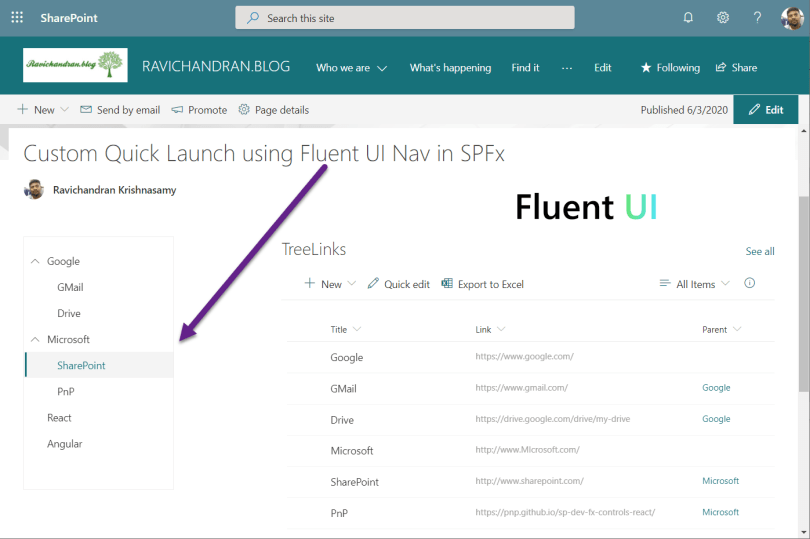
Title- single line of text, Link- single line of text, Parent – Hyperlink, these are the three column types right
LikeLike
“Parent” is the lookup of the same list’s Title field
LikeLiked by 1 person
ok, thank you.
its working but nested childs are not working can you update the code for the same
LikeLiked by 1 person
HI Ravi,
Im waiting for your reply on child nodes, will you be updating the code??
LikeLiked by 1 person
You have to work for your requirements, I don’t have time to work for you
LikeLiked by 1 person
I created one ore column called ParentId and then its working, do you have code for nested childs, now it supports only single child, below Gmail i need few childs
LikeLiked by 1 person
Hi, great article, have you find a way to deploy it to all pages in the left navigation place automatically for all pages? as a chrome or replace the existing OOB control?
LikeLike
Hi Freddie,
If you want to add to all pages, then create SPFx application customizer and place the quick launch using JQuery.
LikeLike